简介
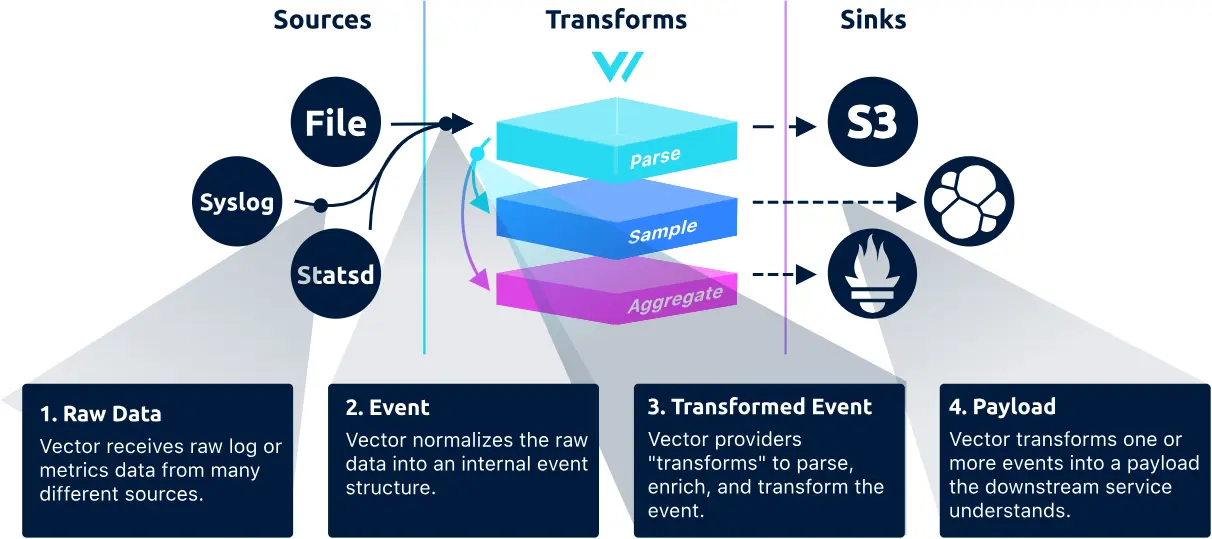
Vector 是一个高性能日志与指标采集代理,它从各种 source 收集数据,经过 transform 处理后发送到 sink(如 Loki、ClickHouse、Kafka、Elasticsearch 等)
它的特点是高吞吐、低延迟、无需依赖 JVM、轻量好部署,非常适合边缘节点和容器环境
本文主要讲述 Events 和 Compnents
1. 配置结构概览
Vector 有两种数据模型 (Data Model), 又称事件(Events):
- Logs: 用于表示结构化或非结构化日志数据
- metrics: 用于表示指标数据
Vector 的配置由三个核心部分 (Compnets) 组成:
- sources:数据采集源
- transforms:数据处理与解析
- sinks:输出目标
2. Data model(events)
Log events
Here’s an example representation of a log event (as JSON):
{
  "log": {
    "custom": "field",
    "host": "my.host.com",
    "message": "Hello world",
    "timestamp": "2020-11-01T21:15:47+00:00"
  }
}
Metric event
此处留给以后撰写
3. Compnents
3.1 source
详细配置请见 👉 Sources reference
此处只详细介绍以 File 为 source
Example configurations(配置文件均为 toml, 下同)
# minimal
[sources.my_source_id]
type = "file"
include = [ "/var/log/**/*.log" ]
3.2 transform
详细配置请见 👉 Sources reference
此处只详细介绍 Remap with VRL(即重新匹配)
3.2.1 Parse key/value (logfmt) logs
以 key/value 形式的日志为例
注意下面的数据格式经过
source处理过 (会加上log和message包裹), 我们写入的日志文件中不必在外面加上log和message包裹, 不然会导致二次包裹,transform找不到我们真正的日志数据
{
  "log": {
    "message": "@timestamp=\"Sun Jan 10 16:47:39 EST 2021\" level=info msg=\"Stopping all fetchers\" tag#production=stopping_fetchers id=ConsumerFetcherManager-1382721708341 module=kafka.consumer.ConsumerFetcherManager"
  }
}
Example configurations
[transforms.my_transform_id]
type = "remap"
inputs = [ "my-source-or-transform-id" ]
source = ". = parse_key_value!(.message)"
3.2.2 Parse custom logs
如果有数据类型的需要, 还需要在配置中进行数据转换, 因为默认解析出来的是 string
Example configurations
# Coerce parsed fields
.timestamp = parse_timestamp(.timestamp, "%Y/%m/%d %H:%M:%S %z") ?? now()
.pid = to_int!(.pid)
.tid = to_int!(.tid)
3.3 sink
详细配置请见 👉 Sources reference
此处只详细介绍如何输出到 ClickHouse
Example configurations
[sinks.my_sink_id]
type = "clickhouse"
inputs = [ "my-source-or-transform-id" ]
endpoint = "http://localhost:8123"
table = "mytable"
如果还需要认证登录, 此处以用户密码登录为例
[sinks.my_sink_id.auth]
strategy = "basic"
user = "default"
password = "your_password"
关于 ClickHouse 数据库的使用见笔记 👉高性能数据库 ClickHouse